While making this site, we felt the need for a favicon. So we needed an .ico file. Since photoshop and paint both can’t produce icon files, I began my search for a useful icon editor. After quick search on sourceforge, I found VariIcons, which looked quite nice, so I gave it a try.
When I installed the application, I found the first problem: it’s a German distribution. Needless to say, this makes it quite hard to understand if your German is as bad as mine (and it is quite bad…), but without understanding a word of it, you should be able to click your way through the installation. The real problem begins while trying to create your icon…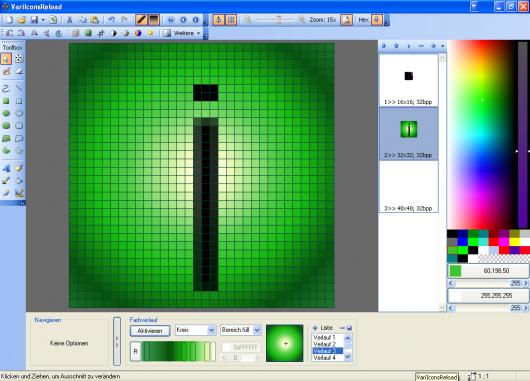 The basic tools are quite obvious, and probably don’t require any knowledge of the German language, but if you want to use the gradient tool, you need some extra brainpower to get it working (or a mediocre online translator of course…). This gradient tool is quite a simple one, with very few effects, but getting it working will add a nice extra to your icons. Besides the gradient tool, you can apply some anti-aliasing effects on your lines and text, making the effects you apply look a bit smoother. VariIcons also give you the possibility to freely rotate your image. These two options make VariIcons a bit more useful than Paint, but it’s still a few classes worse than Adobe Photoshop. As you probably want to export your image, you can export it as a png image, or as an .ico image. The last option only seems to work if you fill in all three fields in the editor. Everything seems to work pretty smoothly if you have found out how it works, and you can probably get some nice effects out of it. The only problem is to figure out how it works, because everything, including the help file, is in German. This language problem, next to the limited possibilities, doesn’t make it the ideal application for editing icons, but if you don’t need an advanced editor, you will be quite satisfied, because everything this application offers really works in a smooth way. Score
6/10
Screenshots 
 Links Project Link Download link
I Downloaded this little application from Sourceforge just this morning.
I often need custom Icons, but I’m just not happy with the ones my “Icon suite” can create.
There was only one version of the file available for download, and sourceforge never mentioned language Issues at all…
so, You can imagine my surprise when I noticed I couldn’t read anything the installer said. Okay, I’d had a long night studying, but was I really that tired? NO, as it turns out my eyes were okay, it’s just that everything in this little program REALLY is written in German. 😯
( I don’t read German at all …not a word..not a line..none at all.) This thing is supposed to create text, maybe it even does, but I don’t know how, The text tool didn’t seem to work.
I did figure out the gradient tool, but setting the colors is difficult and doesn’t work well on my computer. None of it really worked well on my computer, the paint brush didn’t paint every time. I had been hoping to import already prepared images to create my icons, but hmm, I just cant figure out how to do that. Long story short, unless your language of choice is German it probably isn’t worth the download. If German is your language, and you don’t need much of an Icon builder, this one might do.
Additional note: The little cross bars that help you line up angles and lines are kind of fun at first, and the color picker is better than those on
most of the freeware Icon creation tools I’ve tried.
permainan slot online adalah
Create icons with VariIcons | Internetspotter
https://csnbola.xyz
Create icons with VariIcons | Internetspotter
konsep oop java
Create icons with VariIcons | Internetspotter
https://banyakhoki.xyz
Create icons with VariIcons | Internetspotter
concrete paving near me
Create icons with VariIcons | Internetspotter